TERMS & CONDITIONS
Your Terms, Agreed To & On the Record
Write your service terms once. Maidily shows them on every booking form, quote, and invoice — and quietly records exactly what each customer agreed to, when, and from where. If a dispute ever comes up, the proof is already in your account.
terms
invoice
acceptance
Protect Your Business Without the Paperwork
No PDFs to email, no signatures to chase. Your terms travel with every customer touchpoint, and acceptance is captured the moment it happens.
Your Default Terms
Add your cancellation policy, payment terms, access requirements, and satisfaction guarantee in one place. They automatically appear on every new invoice and booking form.
Need different wording for a specific booking form or a one-off invoice? Override it just for that one — your default stays untouched everywhere else.
Built-In Consent
A short SMS & email communications consent is always included alongside your terms, so the texts and emails Maidily sends on your behalf stay compliant — handled for you.
Locked
On Acceptance
Frozen in Time
The exact wording a customer agreed to is saved word-for-word. Edit your terms later and past agreements stay exactly as they were accepted.
Timestamp & IP
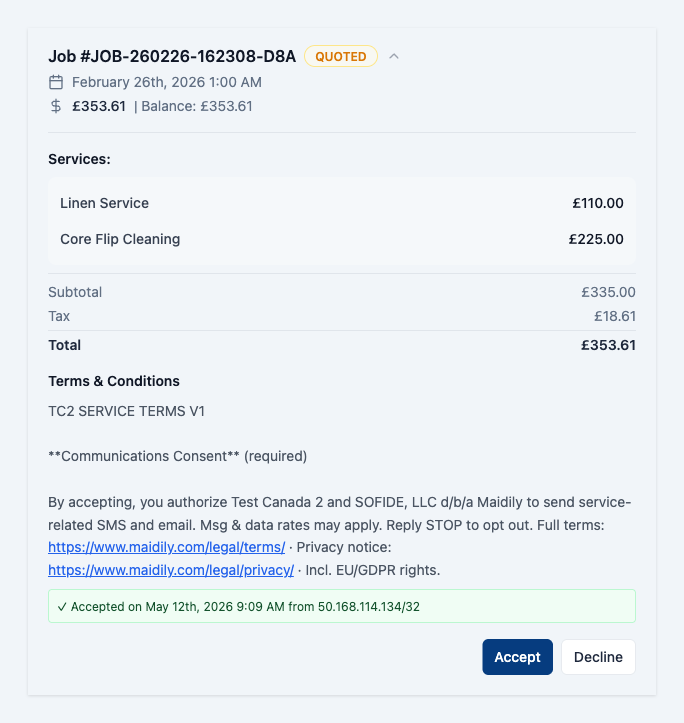
Every acceptance is stamped with the date, time, and the customer's IP address — captured automatically, viewable on the invoice.
surface
One Set of Terms, Everywhere
Booking forms, quote forms, online quote acceptance, and invoice payment all show — and record — the same terms. Whether a customer books online, accepts a quote, or pays an invoice, the agreement is captured the same way.
WHERE YOU SET THEM
Settings → Customer Billing
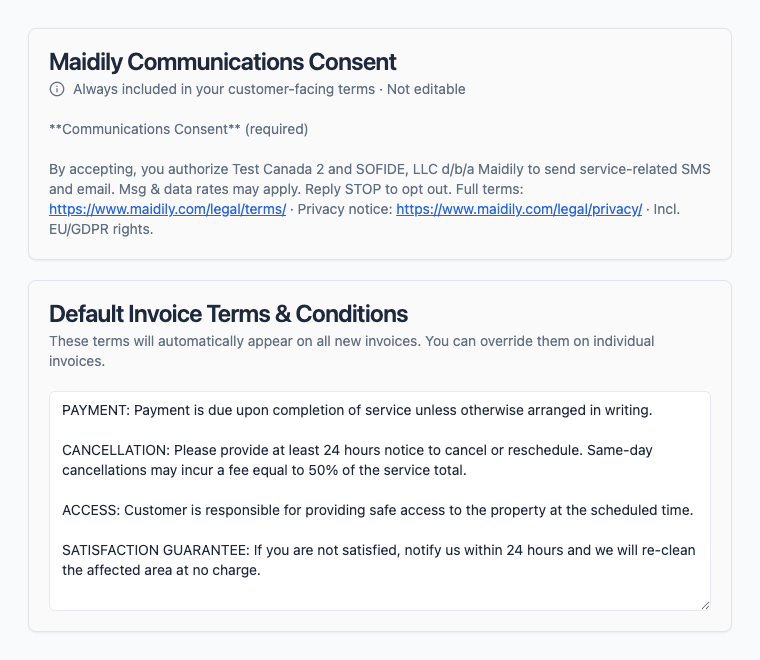
Open Settings → Customer Billing and type your terms into the Default Invoice Terms & Conditions box. That's it — they'll start appearing on new invoices and booking forms right away.
- Plain text — write it the way you'd say it to a customer.
- The Maidily Communications Consent block is shown here too, read-only — it's always added for you so you don't have to write your own SMS/email consent language.
- Want different terms on a specific booking form or invoice? Override it there — this default still applies everywhere else.
How Maidily Decides Which Terms to Show
Maidily always shows the most specific terms you've set, then adds the communications consent. The most specific wins — here's the order it checks.
This Booking Form's Terms
If you set custom terms on the form a customer is using, those are shown.
This Invoice's Terms
Otherwise, terms set on the specific invoice the customer is paying.
Your Default Terms
Otherwise, the default from Settings → Customer Billing.
Communications Consent
Always added on top, automatically — every time.
Haven't set any terms yet? Customers still see — and agree to — the Maidily communications consent, so your messaging stays compliant from day one.
What Your Customers See
Clear, unmissable, and impossible to skip — agreement is required before a customer can book, accept a quote, or pay.
On a Booking or Quote Form
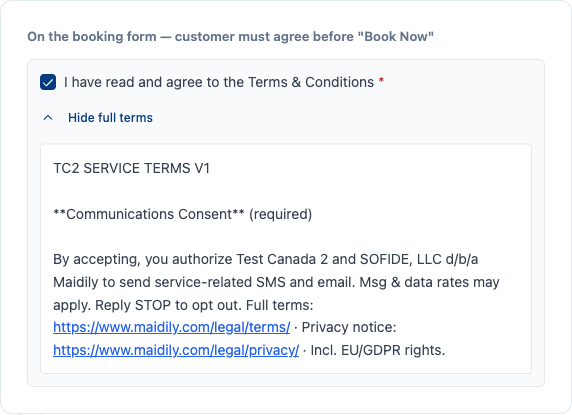
A required checkbox sits with the order summary. Customers can expand the full terms inline before they agree — and the form won't submit until they do.
Accepting a Quote or Paying
When a customer accepts a quote or pays an invoice from their job page, the same terms are shown — and once they accept, a green receipt confirms the date, time, and IP on record.
Set Your Terms Once. Stay Protected Forever.
Join thousands of cleaning businesses that get clear, recorded agreement from every customer — automatically. Start free, no credit card required.